Introduction
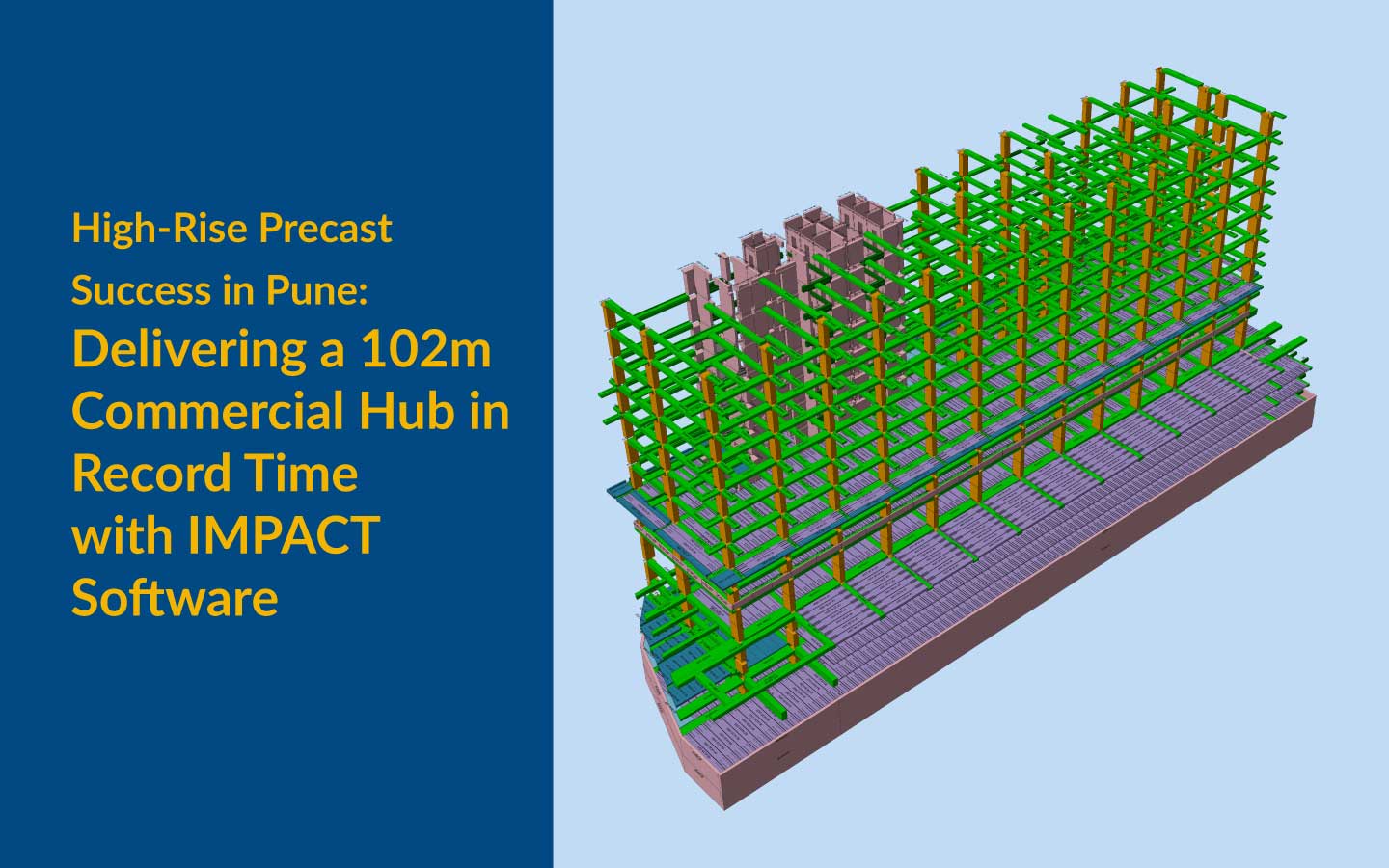
Managing complex precast structural detailing requires absolute precision, flawless timeline management, and seamless stakeholder communication. For a 102-meter-tall commercial building project like M81 in Pune, India—comprising 5 basements, a ground floor, 2 podiums, and 15 office floors—coordination is highly demanding. The transition from conventional RCC designs to integrated precast detailing shop drawings introduces significant day-to-day coordination challenges.
To eliminate communication gaps and keep deliverables strictly aligned with factory and site schedules, our service team leverages IMPACT software’s fully customizable Status Color module. In this interview, our In-House Project Coordinator, Ms. Alpana Jadhav, shares how visual tracking transforms tracking workflows, reduces administrative tasks, and keeps clients, detailers, and resource managers in perfect sync.
The Interview
Q1: Alpana, welcome. To set the stage, could you tell us about the M81 project and the coordination challenges you initially faced?
Alpana: Thank you! The M81 project is a massive commercial building here in Pune. It has a very complex structural makeup, featuring vertical members like structural/non-structural walls and columns, alongside horizontal members like beams, Hollow Core Slabs (HCS), and Prestressed Solid Slabs (PSS).
Because India is in an earthquake-prone zone, the structural detailing is inherently complex to meet rigorous safety constraints. Transitioning those conventional designs into integrated precast detailing shop drawings was our biggest hurdle. With a tight factory and site delivery schedule, any delay or miscommunication regarding element status could stall the entire pipeline.
Q2: With a 5-person specialized team executing both modeling and detailing simultaneously, how do you prevent communication breakdowns?
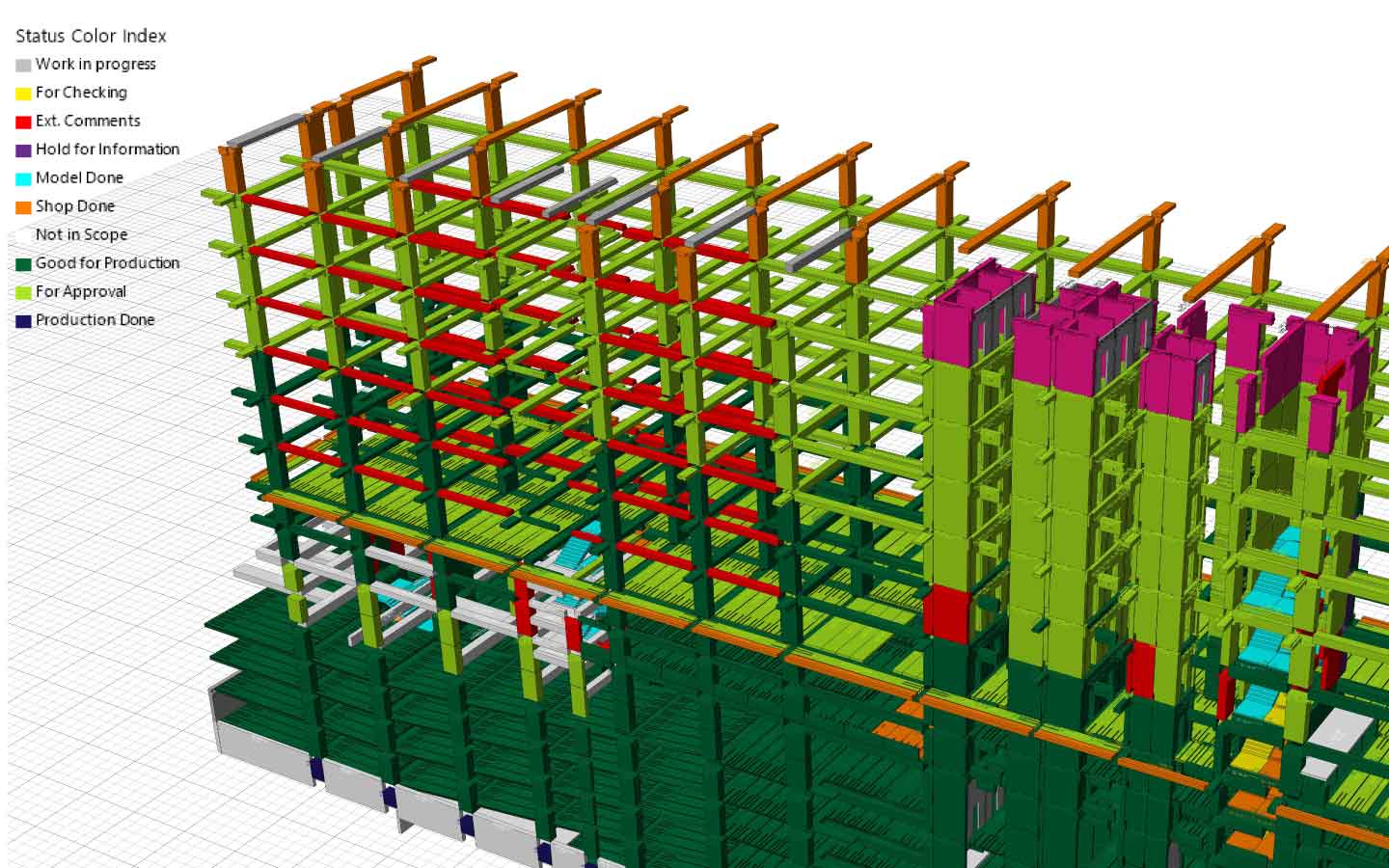
Alpana: It takes tremendous effort and clear communication to keep a fast-paced team aligned. That’s where the IMPACT Status Color Index becomes our single source of truth. Instead of hunting through endless spreadsheets or exchanging dozens of daily emails to check if an element is being modeled, checked, or sent for approval, IMPACT allows us to assign a specific, customizable color code to every single precast element in the 3D model.
At a single glance, the entire team—and the client—knows exactly where an element stands in the lifecycle.
Q3: Let’s talk about your first major use case: high-level tracking with clients and stakeholders. How does the Status Color module change your interactions with them?
Alpana: It has completely transformed the dynamic. Before a project even kicks off, these legend details are created and fully customized using the Resource Manager.
During the execution phase, I rely on this visual legend constantly to evaluate high-level project health. If a client wants an update, they don’t have to wait for me to compile a manual report. Because of IMPACT’s cloud capabilities, clients can log directly into the system from their end and view the live model colored by status.
Q4: Can you walk us through how specific status colors help both you and the client make faster decisions?
Alpana: Absolutely. Let’s look at a few examples from our standard color index:
- Yellow (For Checking) & Light Blue (New Update): Tells us exactly what is ready for internal review or what has been modified.
- Purple (Hold for Information): If we encounter a complex joinery clash during our regular clash checking stages—say, near a beam-wall or beam-beam junction—we switch that element to Purple. The client immediately sees the hold on their dashboard, knows we need more information or design clearance, and can act instantly.
- Brown (Int. Comments) & Red (Ext. Comments): Visually flags where feedback needs to be addressed.
- Dark Green (Good for Production): The ultimate green light! It means the shop drawings are exported, the element is error-free, and it is 100% ready for the factory floor.
This transparency reduces back-and-forth communication time dramatically because everyone reacts to the same visual cues.
Q5: That handles external tracking beautifully. Let’s dive into your second use case: internal task distribution and managing your team of detailers. How does this system work on the shop floor?
Alpana: This is where the operational efficiency really shines. When I distribute work to our detailers, I use the legends specifically customized to our internal workflow. I can assign a specific model color to a team member and instruct them to complete the detailing for that color block.
It makes the work highly targeted. For example, a detailer can see a cluster of elements marked as Cyan (Model Done) and know their precise task is to progress them to Orange (Shop Done) by generating the fabrication-ready DWG/PDF drawings.
Q6: How does this color-coded assignment impact temporary or new employees joining the team?
Alpana: It eliminates the learning curve and any potential communication gaps entirely. Even a temporary employee or a new detailer can look at the 3D workspace and instantly understand exactly what work has been assigned to them based on the color matrix. There’s no ambiguity, no overlapping work, and zero downtime spent wondering, “What do I work on next?”
Q7: What if the client manages their own team resource center directly? Can they see who is working on what?
Alpana: Yes, exactly! If the client utilizes a team resource center managed directly on their end, they can see precisely which element is being designed by which specific employee. It provides an unprecedented level of accountability and visibility for the client, further cementing their trust in our service team’s capabilities.
Q8: We know that maintaining strict tolerances—like the 20 mm tolerance strategy used on M81—requires absolute precision. How do status colors support that?
Alpana: On the M81 project, implementing a rigorous 20 mm tolerance for elements was a proactive measure to ensure seamless fitting during erection and absorb site deviations without costly re-work. To achieve this, our clash checking and quality audits had to be flawless.
By using the color index, we make sure no element ever moves to Dark Green (Good for Production) unless it has successfully cycled through the Yellow (For Checking) and Lime Green (For Approval) stages. The colors act as strict, visual quality gates that protect our engineering precision.
Q9: Looking back at how you used to manage projects versus how you manage them now with IMPACT, what is the biggest takeaway?
Alpana: It simply keeps everyone accountable while drastically reducing the administrative burden. I spend less time playing ‘information telephone’ between the client, the resource manager, and the detailers, and more time optimizing our workflow. It takes the guesswork out of project coordination.
Q10: To conclude, how would you summarize the value that the combination of IMPACT software and your service team brings to a structural precast project?
Alpana: The software gives us an incredibly powerful, flexible platform, but it’s our service team’s expertise in leveraging modules like the Status Color Index that turns it into a benchmark-setting workflow. We don’t just model; we build an integrated ecosystem where data flows visually, timelines are protected, and complex commercial projects are delivered seamlessly and on schedule.
Key Takeaways & System Capability
| Feature | Impact Capability | Our Service Team Value |
|---|---|---|
| High-Level Visibility | Real-time, cloud-accessible 3D model filtering via customizable status colors. | Proactive project coordination, rapid clash resolution, and clear client dashboards. |
| Resource & Task Management | Fully customizable legends via Resource Manager to filter by element status. | Zero communication gaps, seamless onboarding for temporary staff, and optimized detailing workflows. |
| Quality & Delivery Control | Clear visual gates spanning from Work in Progress to Good for Production. | Strict enforcement of engineering tolerances (e.g., 20 mm strategy) and clash-free shop drawings. |
Ready to eliminate the communication gaps in your next precast project? Don’t let complex detailing and fragmented communication slow down your construction timelines. Partner with our expert service team and leverage the full, visual power of IMPACT software to keep your stakeholders aligned, your design teams accountable, and your fabrication schedules perfectly on track.